
ZPHP Campaign Delivering Remcos RAT Impacting SLTTs
By: The Center for Internet Security® (CIS®) Cyber Threat Intelligence (CTI) team
Published March 17, 2026
The Center for Internet Security® (CIS®) Cyber Threat Intelligence (CTI) team identified an ongoing ZPHP malware campaign impacting U.S. State, Local, Tribal, and Territorial (SLTT) government organizations that delivers the Remcos remote access trojan (RAT). Following a CIS Managed Detection and Response™ (CIS MDR™) alert involving the ClickFix technique, CIS CTI determined the campaign’s broader kill chain incorporated several common features across multiple malware families — namely, using fake CAPTCHAs and the ClickFix technique for remote access payload delivery. The team assesses it is highly likely similar campaigns will leverage ClickFix variants to impact SLTTs throughout 2026 due to the technique’s scalability, ease of implementation, and ability to compromise multiple victims quickly.
ZPHP Campaigns' Use of ClickFix and Fake CAPTCHAs
 ZPHP, also known as SmartApeSG, is a JavaScript-based malware loader campaign that uses compromised websites to deliver malware or malicious remote access tools. Earlier campaigns have relied on fake browser update prompts, but activity observed at the time of publication primarily uses the ClickFix technique and a CAPTCHA page masquerading as a Cloudflare Turnstile verification prompt (Figure 1). These social engineering lures are designed to trick users into manually executing attacker‑supplied commands to deliver malware.
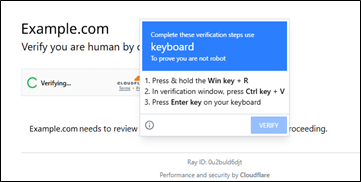
Figure 1: Fake CAPTCHA Verification Steps
Once they compromise a website, cyber threat actors (CTAs) embed hidden malicious JavaScript into the webpage. When specific conditions are met, such as using a Windows system, the malicious JavaScript executes replacing the webpage’s content with a fake CAPTCHA verification page with the prompt, “Verify you are human.” Once the victim clicks the prompt, the fake CAPTCHA instructs the victim to complete a series of steps for verification:
- Press hold the Win key + R
- In verification window, press Ctrl + V
- Press Enter on your keyboard
These steps initiate the ZPHP kill chain by socially engineering the victim to run a command on their machine that reaches out to attacker-controlled infrastructure, retrieves an additional malicious script, and launches the next stage of the kill chain. Depending on the campaign, this step delivers the final payload, which has included the NetSupport remote access tool, Remcos RAT, and others.
A Brief Note on the Remcos RAT
Remcos stands for "Remote Control and Surveillance" and is an RAT sold as a remote access tool. Unlike other remote access tools, Remcos is marketed and sold as legitimate software by Breaking Security for remote management of Windows systems, as reported by Trend Micro, but it is almost exclusively used by cyber threat actors.
Historical ZPHP Impact on SLTTs
CIS CTI’s investigation into the activity identified through the initial CIS MDR alert revealed three additional SLTT organizations experienced similar ClickFix‑related alerts in February 2026. ZPHP malware campaigns are widespread and opportunistic. They've consistently appeared in CIS's Quarterly Top 10 Malware list since the second quarter of 2024, highlighting their broad victim profile and scale. At the start of 2026, CIS’s Albert Network Monitoring and Management intrusion detection system (IDS) generated 61 alerts associated with ZPHP activity. Additionally, at the time of publication, the Malicious Domain Blocking and Reporting (MDBR) service of the Multi-State Information Sharing and Analysis Center® (MS-ISAC®) has blocked nearly 500,000 DNS requests tied to the campaign across 162 member organizations.
Technical Analysis of the ZPHP Campaign
 On January 28, 2026, the 24x7x365 U.S.-based CIS Security Operations Center (SOC) alerted CIS CTI to a CIS MDR detection related to a ClickFix attack on an SLTT endpoint. The detection showed the end user had been socially engineered through a CAPTCHA page masquerading as a Cloudflare Turnstile CAPTCHA to run a malicious command from the Run window, as shown in Figure 2. Analysis of the command revealed an environment verification step that checks for the existence of notepad.exe in the System32 directory before executing mshta.exe. This is likely a defense evasion technique designed to identify sandbox environments and hinder analysis by ensuring the script only executes on legitimate victim hosts. CIS MDR successfully detected this activity, and the alert prompted CIS CTI to perform further investigation. The team analyzed the alert and pivoted off the IP address in the command to identify associated infrastructure, additional indicators of compromise (IOCs), and the payload delivered later in the kill chain.

Figure 2: Script User copied and pasted into Run Window following the fake CAPTCHA verification steps
Kill Chain Analysis
During investigation of the alert and command and control (C2) infrastructure, CIS CTI identified and analyzed the malicious JavaScript file, middleware-render.js, which is responsible for triggering the fake CAPTCHA and executing the ClickFix technique. The file’s name was likely chosen to blend in with common Node.js application structures, as the name "middleware.js" is a common filename across Node.js-based web applications.
The JavaScript uses the React 19 and Tailwind CSS frameworks, and it is injected into Node.js-based architectures. The script checks the client-side environment for specific conditions that must be met before populating the fake CAPTCHA. The first condition is the victim must be using a Windows System, as shown in Figure 3.
 Figure 3: JavaScript Windows Condition
The second condition is that the visiting machine must be either visiting the site for the first time or have visited it in the last 27.5 days (Figure 4). However, despite meeting these conditions during analysis, CIS CTI could not replicate the fake CAPTCHA likely due to server-side gating logic to evade virtualized analysis and prevent reinfection. When all the conditions are met, the script removes all existing CSS on the page, replacing the website’s content with the fake CAPTCHA.

Figure 4: JavaScript Time Condition
CIS CTI’s analysis of the C2 infrastructure at 193.42.38[.]42 identified the next-stage payload, an HTA file named "rate." If the attack succeeded, this HTA file would have downloaded and delivered the payload from the mshta.exe execution triggered by the clipboard-injected command. The HTA file contained JavaScript that when executed by mshta.exe immediately hides its window, obtains full operating system (OS) access through a COM object, var shell = new ActiveXObject("WScript.Shell"), and constructs a PowerShell script that runs in a hidden command prompt. The PowerShell script downloads a ZIP archive to the victim’s LOCALAPPDATA directory and saves it with a random six-digit filename and PDF extension. Once the PowerShell command is created, the HTA closes its window and the command prompt exits, leaving PowerShell running in the background.
Although CIS CTI could not recover the complete PowerShell script, analysis of the C2 infrastructure indicates the ZIP archive would be downloaded from hxxp://193.42.38[.]42/limit.
Payload Analysis
As reported by Malware-Traffic-Analysis.net, the final payload is a large 38.38 MB ZIP archive containing over 90 files and is saved as "C:\Users\[username]\AppData\Local\[Random 6 Digit String].pdf" prior to extraction.Analysis shows the final payload is Remcos RAT hidden via steganography among the over 90 files, which are mostly legitimate DLL files from open-source and commercial software projects including Qt6, OpenSSL, and Intel TBB.
CIS CTI identified four of the files in the ZIP archive as malicious: autohealth.dat, ActionCenterHelper.dll, mega_altpllq.exe, and Multiple_Predict.dat. The file, Mega_altpllq.exe, is the primary executable and the trigger for DLL sideloading, while ActionCenterHelper.dll is a maliciously sideloaded DLL and is not digitally signed. Analysis reveals that it opens and reads the autohealth.dat, which contains the encrypted Remcos Rat payload disguised as PostgreSQL data, as well as contains logic to locate the encrypted payload, decrypt it in memory, and inject it, per Trend Micro.
Remcos RAT is used for full system control; according to both Point Wild and MITRE ATT&CK, its capabilities include keylogging, screen and webcam capture, audio recording, file manipulation, credential theft, data exfiltration, and remote code execution. Once Remcos RAT is injected into memory, the malware establishes persistence through a scheduled task and a Windows registry Run key, both named Intel PLLQ Components, as shared by Malware-Traffic-Analysis.net. The use of Intel in these persistence mechanisms mimics legitimate Intel processor components, reducing the likelihood of detection.
When the Remcos RAT has gained persistence in the victim’s system, it beacons to its C2 server over HTTPs using a self-signed certificate. The Remcos C2 IP addresses rotate frequently, notes Malware-Traffic-Analysis.net, with one observed example including 192.144.56[.]80:443.
Defend against ZPHP and Remcos RAT
 To strengthen your cyber defenses against ZPHP and Remcos RAT, you can join the MS-ISAC, a community dedicated to the collective defense of U.S. SLTTs. Members received early reporting on the ZPHP malware campaign discussed above, including over 400 IOCs disseminated through the CIS Indicator Sharing Program, and they received a more in-depth report, including specific incident response findings and additional IOCs. Members also receive support through services like MDBR to take a proactive approach to defending against malware like ZPHP.
Ready to start receiving actionable threat intelligence that directly supports your proactive defense and informed decision-making?
About the Author: The CIS Cyber Threat Intelligence (CTI) team at the Multi-State Infrastructure Information Sharing and Analysis Center (MS-ISAC®) functions as the premier CTI source for all U.S. State, Local, Tribal, and Territorial (SLTT) entities and election offices.With decades of combined experience in all types of industries, the CIS CTI team pushes out curated SLTT-centric threat intelligence reporting as well as malicious indicators via near real-time threat feeds. This information helps SLTTs anticipate and proactively defend against emerging cyber threats and shifts in adversarial tactics, techniques, and procedures. Additional information: team tradecraft and indicator feeds.
As of June 23, 2025, the MS-ISAC has introduced a fee-based membership. Any potential reference to no-cost MS-ISAC services no longer applies.